
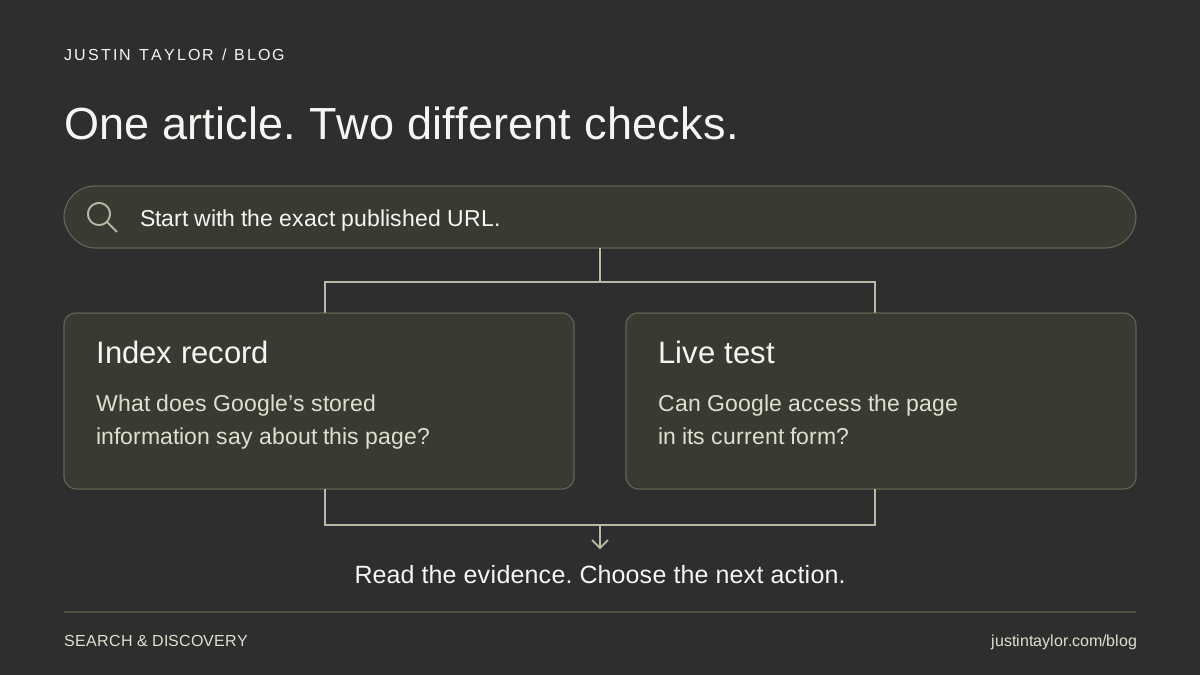
To check whether Google has indexed a real estate blog post, inspect its exact published URL in Google Search Console. Read the indexing result, then investigate the stated reason if the page is missing. A successful sitemap submission or live test does not mean every article is in Google’s index.
You do not need to manually submit every new post as a routine publishing requirement. Start with a website that exposes its articles through useful links and an updated sitemap. Use individual indexing requests selectively, and keep a record of what Google reports rather than repeatedly pressing the same button.
HubSpot’s AI search optimization guide, updated October 7, 2026, highlights crawlability and indexing as foundations for discovery. For Google’s AI Overviews and AI Mode specifically, Google requires a supporting page to be indexed and eligible for a search snippet. Eligibility does not guarantee a citation or ranking. The checklist below focuses on checking that foundation for an agent’s own website; documentation was reviewed October 16, 2026.
Inspect one article before diagnosing the whole blog
Choose a useful article you actually want prospective clients to find, such as a guide to preparing for a listing consultation. Open its public page and copy the complete address. Avoid a draft preview, tracking link or old URL that now redirects elsewhere.
Follow the URL Inspection instructions:
- Sign in to Search Console and select the website property that contains the article.
- Paste the complete address into the URL inspection field and run the inspection.
- Record the overall verdict and expand Page indexing.
- Review the reason, last crawl information and canonical details where available.
- If the page has changed or you need to check current access, choose Test live URL.
- Save the indexed result and live-test result separately.
The initial inspection uses Google’s stored information; the live test checks the current page. A successful live test does not confirm indexing or test every condition. An indexed result also does not promise that the article will appear for a particular search.
Keep the homepage and article checks separate. A homepage being indexed tells you about that URL. It is not a certificate covering the entire Blog. Start with one article, understand the evidence and then review other important pages.
Read the status before choosing a fix
Google’s Page indexing report distinguishes several situations. These short interpretations help you choose the next investigation:
| Reported situation | Meaning | Next question |
|---|---|---|
| Discovered - currently not indexed | Google knows the URL but has not crawled it yet; the crawl date may be blank. | Is the page accessible and connected to the rest of the site? |
| Crawled - currently not indexed | Google fetched the page but has not indexed it. | What does the page offer, and are there overlapping versions? |
| A duplicate or alternate page | Another URL may be the version Google uses. | Is that the intended version? |
| A crawl, server or indexing restriction | A specific access problem or instruction needs examination. | Should this public article be restricted? |
A status is evidence about processing, not a complete explanation of content quality. Avoid diagnosing a penalty from one missing article. Equally, do not assume that every excluded URL needs repair: a duplicate address can be behaving as intended.
Check the public page with your website provider
Ask your provider to check the specific URL, using Google’s technical requirements as the baseline. Googlebot must be able to access it, the page must return a successful HTTP 200 response, and it must contain indexable content. Meeting those requirements makes a page eligible; it does not guarantee indexing.
The practical questions are straightforward: is the article public without a login? Is a server or security rule interfering with access? Is a development setting still telling search engines not to index the page? A robots.txt crawl restriction and a noindex instruction serve different purposes, so ask for the exact finding before making a change.
Send your provider the article address, inspection date, reported reason and screenshot. Request a short explanation of what changed, the affected pages and how the live result was checked. That gives you something more useful than “SEO has been fixed.”
Also read the public article on a phone. Confirm that the promised checklist, explanation or resource is present and usable. A technically accessible page can still disappoint the person who opens it. Keep this editorial review alongside the technical checks, with a separate action for each finding.
Check the sitemap and the reader’s path to the article
Open the website’s sitemap address supplied by your provider and confirm that the published article URL is included. In Search Console, open Sitemaps and review the submitted file’s status and last-read information. Google’s Sitemaps report documentation explains that a sitemap tells Google about URLs; it does not ensure that every listed page gets crawled.
Google periodically revisits successfully processed sitemaps. Ordinary additions do not require deleting and recreating the submission every day. If the file cannot be fetched or has errors, have the provider correct the reported problem and follow Google’s resubmission guidance.
Next, begin on your homepage and navigate to the post as a visitor would. Can you find it through Blog and an appropriate topic page? Does a relevant older guide link to it where the extra detail would help? Google recommends crawlable links with descriptive wording, and those links also help readers choose their next step.
For a listing-consultation checklist, a seller-preparation overview is a logical place for a link. An unrelated article about video equipment is not. Use the content-cluster guide to organize related answers, rather than adding the same link everywhere.
Choose between requesting indexing and validating a fix
Google’s recrawl guidance permits an owner or full user of the Search Console property to request indexing for individual URLs. After inspecting a new or meaningfully updated page, use Request indexing when appropriate. Requests have limits; repeating the request for the same URL does not make crawling faster.
Google says crawling can take days to weeks, with no guarantee of inclusion. Use your sitemap for ongoing discovery across a growing library. For an unchanged page already crawled but not indexed, Google’s Page indexing guidance says resubmitting for crawling is unnecessary.
The Validate fix button starts a check of a reported issue after its affected instances are addressed. It does not repair the website. Wait for an existing validation cycle to finish before starting another. If you have not identified a change to make, investigate the reason first.
Consider a hypothetical agent whose newly published consultation guide is discovered but has no crawl date. The provider confirms that it loads publicly, appears in the sitemap and is linked from the seller overview. Record those checks and monitor the URL. Rewriting the article daily, changing its address or buying an indexing promise would not follow from that evidence.
Keep a small publication and review record
Use one row per important article: published URL, reader question, publication date, latest inspection, reported status, live-test result, action owner and next review date. Record an indexing request only when one was actually made. Keep the original publication date and note substantive revisions separately.
A weekly review is a manageable editorial routine, not a Google deadline. Check sooner when a known technical issue has been repaired. If several articles show the same failure, send those examples together so the provider can investigate a shared cause.
Once an article is indexed, the next question is whether it answers the right need. Use the search-intent guide to check the page’s purpose and the Search Console content workflow to review the searches reaching it as data accumulates.
Justin helps real estate professionals connect clear website structure, useful content and practical search decisions. Explore real estate SEO and search strategy or start a conversation about the pages your clients need to find.
Sources & further reading
Platform guidance and research referenced in this article. Reviewed October 16, 2026.
- HubSpot: How AI search optimization works for modern marketers — updated October 7, 2026
- Google Search Central: AI features and your website
- Google Search Console Help: URL Inspection tool
- Google Search Console Help: Page indexing report
- Google Search Central: Technical requirements
- Google Search Console Help: Sitemaps report
- Google Search Central: Link best practices
- Google Search Central: Ask Google to recrawl your URLs

Growth & Strategy Manager at Inspire Title Team | WFG Title. Marketing and AI guidance for real estate professionals.