
Use a YouTube end screen to offer one specific next video as you finish answering a client’s question. Choose the destination before recording your closing line. That lets you tell viewers what they can do there and leave room in the picture for the clickable element.
Imagine a buyer who has just watched your guide to taking notes at a showing. They now have three sets of notes. Their next problem is deciding what to look at on a second visit. An end screen leading to a demonstration of how to plan that visit gives the buyer a reason to keep watching.
Choose a pair of videos that belong together
Start with two videos already on your channel. Watch the final minute of the first and the opening minute of the second, back to back. Write down what the viewer can do after the first video. Then write down the new task the second video helps them complete. If you struggle to name the second task, keep looking through your library.
Flori Needle’s digital strategy guide for HubSpot, updated November 2, 2026, connects channel choices to an audience, an objective and a way to measure progress. You can apply that thinking to one pair of videos. For the buyer above, the objective is to help someone use their tour notes. Later, you can check whether viewers used the link to the demonstration. Read HubSpot’s digital strategy guide.
| What the first video helps someone do | What the next video could show |
|---|---|
| A buyer records observations during a home tour. | Turn one observation and one unanswered question into a second-visit checklist. |
| A seller collects receipts for work done on the home. | Organize sample receipts by project and label the items that still need a date or description. |
| A new agent prepares to film a listing walkthrough. | Compare two recordings of the same introduction and listen for room echo before filming the rest. |
Pick a specific video when your closing line names a particular demonstration. A public playlist makes sense when a viewer has several related tasks ahead. Play the first item yourself and check the sequence before choosing the playlist. See how to organize a real estate playlist around client questions.
Write the sentence that earns the next click
Finish the answer people came for, then invite them to use it. In the home-tour example, the agent could hold up a fictional note that reads “Check desk space in the second bedroom.” The first video can end once the buyer knows how to write an observation specific enough to act on.
SAMPLE CLOSING LINE
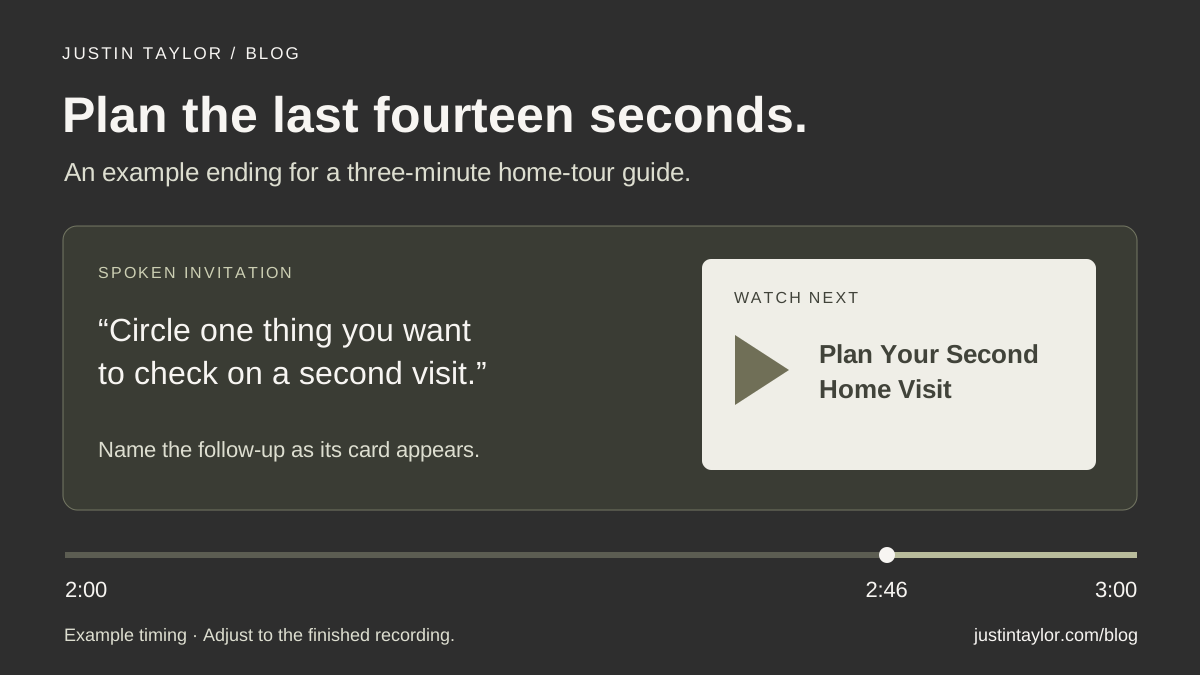
“Circle one thing you want to check in person. In Plan Your Second Home Visit, I’ll show you how I’d turn that desk-space note into a question and a measurement to take.”
Only use that line if the next video actually shows the question and the measurement. “Bring the desk dimensions and measure the available wall” delivers on the promise. A general tour of another listing would leave the buyer looking for the explanation you offered.
For an older recording, listen to the ending before adding anything. An agent who already says “Next time we’ll look at how to plan the second visit” has a natural place for a link. If the agent names a different resource, choose the destination that matches the recording or reserve the new invitation for a future edit.
Make room in the final shot
Take a still from the planned ending and sketch a rectangle where the next video will appear. Check what it covers. If the buyer is still reading that handwritten note, keep it fully visible until the explanation is complete. You can then cut to the agent with open space beside them and introduce the next video there.
For a three-minute example, try finishing the worksheet demonstration at 2:46, switching to the closing shot and bringing up the element as the agent names the next video. Read the line at a conversational pace and adjust the edit by ear. Show the destination long enough for someone to hear the invitation, recognize the title and make a choice.
YouTube requires at least 25 seconds of video and allows an end screen during the final 5–20 seconds. Videos marked as made for kids are ineligible. The external website element requires membership in the YouTube Partner Program. A link to another YouTube video suits the demonstration in this example. Check YouTube’s end screen requirements.
Add the element and try it as a viewer
- In YouTube Studio on desktop, open Content and choose the source video. In its Editor, open End screen.
- Add a Video element and select the specific follow-up. Match its title and thumbnail to the video you watched during planning.
- Drag the element into the open space in the preview. Set its timing on the timeline. Play the transition to check it against the spoken invitation, then save.
Play the published ending in a desktop browser and in the YouTube mobile app. Turn on captions and check that you can read them beside the card. Follow the element and listen to the opening of the destination. Could a buyer tell, within the opening explanation, that they arrived at the desk-space example? Check for a renamed video, an outdated thumbnail or a title that looks confusing when displayed small.
Some viewers hide end screens, and YouTube lists limits on where they appear, including most mobile web browsers. Say the title aloud and include the follow-up’s title in the description so viewers have another way to find it. If you are directing people from a Short, use the separate workflow for that format. Read the guide to related videos in Shorts.
Read the click rate alongside the ending
In the source video’s Studio analytics, open Engagement and look for End screen element click rate. Also look at audience retention near the point when the invitation begins. The first tells you about interaction with the element. The second gives you context about how much of the audience reached the closing shot. See YouTube’s guide to audience retention.
If viewers tend to leave while the agent puts the worksheet away, replay those seconds. The pause may feel like the end of the lesson. On the next recording, try starting the invitation while the worksheet is still in hand. If viewers reach the closing line but few choose the follow-up, ask a colleague to predict what they will see after clicking. Their answer may reveal a mismatch between your wording and the thumbnail. A small number of views is a good reason to gather more observations before changing the edit.
Save the source video, destination, closing line, date checked and one observation together. When a follow-up is replaced, this short record tells the team which older video needs a new link. Bring it to your next content meeting and use the viewing evidence to choose one change for the next shoot. Use the real estate video review guide to plan that discussion.
Sources & further reading
Platform guidance and research referenced in this article. Reviewed November 7, 2026.
Growth & Strategy Manager at Inspire Title Team | WFG Title. Marketing and AI guidance for real estate professionals.