
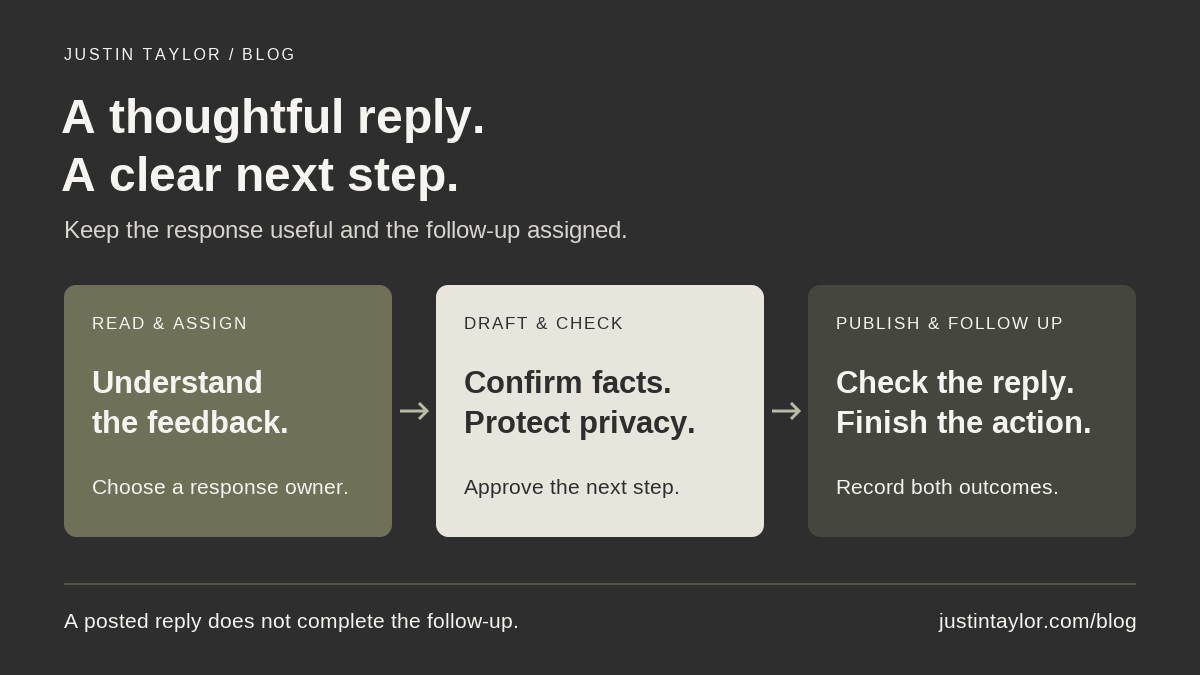
A useful Google review reply acknowledges the feedback, stays within what the business can confirm and gives an appropriate next step when one is needed. For a real estate team, a reliable process is to assign the review, draft a response, check the facts and privacy, then verify the reply after submission.
That process matters because the audience includes people who have never contacted you. A prospective seller may read your response to a communication concern while deciding whether to call. Your answer should help that reader understand how you handle feedback without turning a public thread into a transaction history.
A Semrush article published November 17, 2026 examined local search results and found that review volume alone did not explain which businesses appeared in its AI Overview observations. The study covered other service industries, not real estate. It is a useful reminder to avoid treating review activity as a visibility formula. The workflow below focuses on the client-facing communication your team can control.
Assign the review before drafting
Choose one person to monitor incoming feedback and identify the colleague responsible for the response. A small team might use an assistant for routine drafts and the team leader for concerns that require investigation. Write down who can approve and publish each type of reply.
Confirm which business the review addresses. An agent’s profile and a brokerage’s profile may have different owners and responsibilities. Use the Business Profile access checklist to resolve account access before a time-sensitive response is waiting.
Keep the working record simple: the review link, date noticed, response owner, current status and next action. Store any private investigation in the appropriate restricted system. A shared marketing tracker does not need copies of client documents or a detailed account of the transaction.
Set a review interval your team can maintain. For example, a designated person could check on working mornings, acknowledge items internally and assign anything needing a decision. This is an operational choice, not a Google deadline or a ranking requirement.
Choose the next action from the content
Read the words before reacting to the star rating. A favorable review can contain a question, while a critical review can describe a specific problem the team can address. Decide whether you have enough information to write accurately.
| What the review contains | Useful next action |
|---|---|
| A clear compliment | Acknowledge the service detail the reviewer mentioned without adding private context. |
| A question or unresolved concern | Assign someone to check the facts and prepare an appropriate contact route. |
| Details you cannot match | Investigate internally before claiming that the review is mistaken or fabricated. |
| A possible policy violation | Compare the content with Google’s policy and use the reporting route when justified. |
A rating without written comments may only warrant a brief acknowledgment. There is no need to invent an experience to make a reply sound personal. Prioritize responses where you can answer a question, acknowledge a meaningful detail or provide a helpful update.
Draft a response that fits the review
Use a short structure: acknowledge the point, add only a relevant confirmed detail and offer a next step if the situation calls for one. A positive review usually needs less explanation than an unresolved concern.
Google’s reply guidance recommends clear, professional responses, avoiding promotional language and taking complex concerns into a private conversation. For a real estate team, that means resisting the urge to fill a thank-you with city names, specialties or a sales pitch.
The examples below are fictional writing exercises. They are not actual reviews of Justin or another business, and they should only be adapted when their wording fits the facts.
A compliment about clear explanations
“Thank you for sharing this. We’re glad the explanations were clear and that you felt comfortable asking questions.”
This acknowledges the stated experience without adding a property address, price or reason for the move. Avoid promising that every future client will have the same outcome.
A concern about a delayed response
“Thank you for bringing this to our attention. We’re sorry you had difficulty reaching the team. Please call the office number on our profile and ask for the team lead so we can understand what happened and follow up.”
Use that invitation only if the team lead is the right contact and someone will handle the call. If you have verified a mistake, acknowledge it appropriately. Do not say the matter has been resolved when it has only been assigned.
A review the team cannot identify
“We haven’t been able to match the details in your review to our records. Please contact our office through the number on this profile so we can look into your concern.”
That wording requires an actual records check. An unfamiliar display name does not establish that someone had no interaction with the business. Avoid a public accusation or a demand that the reviewer prove their identity in the comments.
Check facts and privacy before publishing
Have the approver read the draft as someone outside the transaction would. Does it add information that the business has no reason to disclose publicly? Does it claim an action has happened when the team has only discussed doing it?
For example, “Thank you for trusting us” can stand on its own. Adding the client’s loan issue, family situation or negotiation details changes the reply into a disclosure. Even when the review mentions a personal circumstance, the business does not need to repeat or expand it.
Google’s content policy restricts sharing personal information without consent and prohibits various forms of fake engagement and rating manipulation. Keep account numbers, documents and private contact details out of the public reply.
Also inspect the promised next step. If you write that someone will call, confirm who owns that action. If you direct the reviewer to the office number, test that the listed number reaches the intended team. A polished sentence is incomplete when its follow-up goes nowhere.
Publish through the correct profile and confirm the result
Google’s current review-management instructions require a verified business before replying. While signed in to the account that manages the intended profile:
- Open the Business Profile and select Read reviews.
- Find the correct review and select Reply.
- Enter the approved response, reread it in context and select Reply to submit.
- Check the public result after Google’s review process. Record whether the response is pending, needs an edit or is visible.
An approved response appears publicly beneath the review, and Google notifies the reviewer. The reviewer can subsequently change their review. Save the link and publication status so the next team member can find the conversation without reconstructing it.
If your response needs correction, open Read reviews, select Edit beneath your reply, revise the text and choose Update. Deleting your own reply does not delete the customer’s review.
Separate a policy report from a disagreement
A critical review is not automatically removable. Google’s reporting guidance says removal is for policy violations, not simply reviews the business dislikes or disputes.
If you identify a specific violation, open the review in your Business Profile, select Report, choose the relevant reason and submit it. Keep the review link and the policy issue in your internal record. Google’s Reviews Management Tool lets you check report status; a report is not a promise of removal.
Handle a genuine service concern separately from that decision. The response owner can still arrange an appropriate private conversation. Do not make assistance conditional on the person changing their rating, and do not offer an incentive to edit or remove feedback.
Close the follow-up and learn from the pattern
Track the public reply and the service follow-up as separate tasks. A visible response does not prove that a question was answered or that the right person called back. Mark each task complete only when its owner has checked the result.
At a regular team review, collect themes without identifying clients. Repeated confusion about appointment preparation might suggest a clearer confirmation message. Questions about who returns calls might indicate that the website’s contact instructions need attention.
Keep requesting honest feedback through a consistent, neutral process; the Google review request guide covers that earlier step. Justin’s Google Business Profile support helps real estate professionals connect accurate profiles, useful contact paths and a manageable maintenance routine. Start with one unanswered review and make sure the response and follow-up both have an owner.
Sources & further reading
Platform guidance and research referenced in this article. Reviewed November 27, 2026.
- Semrush — AI Overviews are taking over the map pack. Here’s what I found (published November 17, 2026)
- Google — Manage customer reviews
- Google — Tips to get more reviews and write helpful replies
- Google — Report inappropriate reviews on your Business Profile
- Google Maps — Prohibited and restricted content

Growth & Strategy Manager at Inspire Title Team | WFG Title. Marketing and AI guidance for real estate professionals.